
3 min read
Transparent PNG Explained: What It Is and When You Actually Need It
Transparent PNG files are one of the most important image formats in modern design, ecommerce, and content creation. If you’ve ever seen a logo, product image, or graphic sitting perfectly on any background, chances are it was saved as a transparent PNG.
This guide explains exactly what a transparent PNG is, when you should use it, when you shouldn’t, and how it impacts quality, conversions, and branding.
Table of Contents
- What a transparent PNG is
- How PNG transparency works
- Why designers use transparent PNG files
- Transparent PNG vs JPG
- When not to use a transparent PNG
- Best practices
What Is a Transparent PNG?
A transparent PNG is an image file that allows parts of the image to be completely invisible. This means the background can be removed while keeping the main subject fully intact.
Unlike JPG files, PNG images support an alpha channel. This allows smooth, clean edges without visible background color.


How PNG Transparency Actually Works
PNG files store transparency data per pixel. Each pixel can be fully visible, partially transparent, or completely invisible.
This matters because:
- Edges look smoother
- Images blend naturally with any background
- No white boxes or halos appear
This is why transparent PNG files are preferred for professional design work.
9 Powerful Reasons to Use a Transparent PNG
1. Clean Logo Placement
Logos must work on light, dark, and patterned backgrounds. A transparent PNG makes this possible.
2. Better Product Images
Ecommerce platforms favor clean product images that can adapt to different layouts.
3. Flexible Website Design
Transparent PNG images allow designers to change background colors without re-exporting assets.
4. Professional Marketing Graphics
Ads, banners, and thumbnails look cleaner with transparent elements.
5. No Background Color Conflicts
You avoid clashing background colors entirely.
6. High-Quality Edges
PNG transparency preserves sharp edges better than JPG.
7. Easier Layering
Transparent PNG files layer perfectly in design software.
8. Brand Consistency
Your visuals remain consistent across platforms.
9. Better Conversion Rates
Clean visuals reduce friction and increase trust.

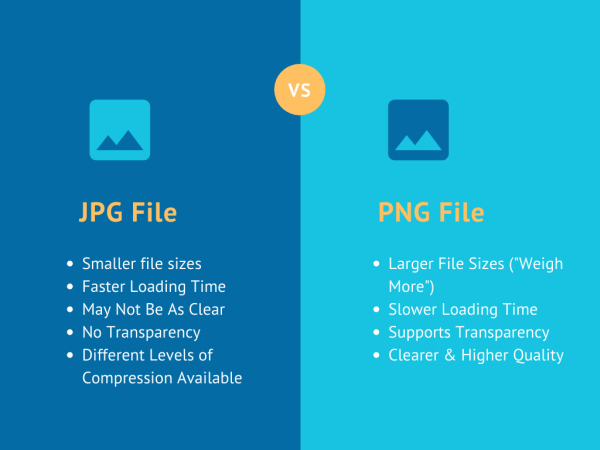
Transparent PNG vs JPG: What’s the Difference?
| Feature | PNG | JPG |
|---|---|---|
| Transparency | Yes | No |
| Edge Quality | High | Lower |
| File Size | Larger | Smaller |
If transparency matters, PNG wins every time.
When You Should NOT Use a Transparent PNG
Despite its advantages, a transparent PNG is not always the best option.
- Large photographic backgrounds
- Hero images where transparency isn’t needed
- Situations where file size must be minimal
In those cases, JPG or WEBP may perform better.
Best Practices for Using Transparent PNG Files
- Always export at the correct resolution
- Avoid over-compression
- Check edges on dark and light backgrounds
- Use PNG only when transparency is needed
For advanced editing and exporting, tools from Adobe are widely used by professionals.
Final Thoughts
A transparent PNG is not just a file format. It’s a foundation for clean design, strong branding, and flexible visuals.
If your images need to work across websites, ecommerce platforms, and marketing materials, transparent PNG files are essential.
Internal links:
How to Remove Background From an Image
How to Make a Logo Background Transparent